How Text Message Sign-In Works
Last updated: November 17, 2026
Overview
The Calls App is operated by Denali Training LLC, doing business as The Calls App. Users can opt in to text messages that include sign-in codes, reminders, account notices and service updates, not only sign-in codes. This page shows exactly how a user opts in.
Step 1: Go to the sign-in page
The user goes to https://thecallsapp.com/auth. The mobile number field and the consent text are shown directly on the sign-in page.
Step 2: Enter a mobile number and see the consent text
The user enters their mobile number. Directly under the field, they see this consent text:
"By entering your mobile number, you agree to receive text messages from The Calls App, including sign-in codes, reminders, account notices and service updates. Message frequency varies. Message and data rates may apply. Reply HELP for help or STOP to opt out. Consent is not a condition of purchase. Your mobile number and text consent will not be shared with third parties. See our Terms of Service and Privacy Policy."
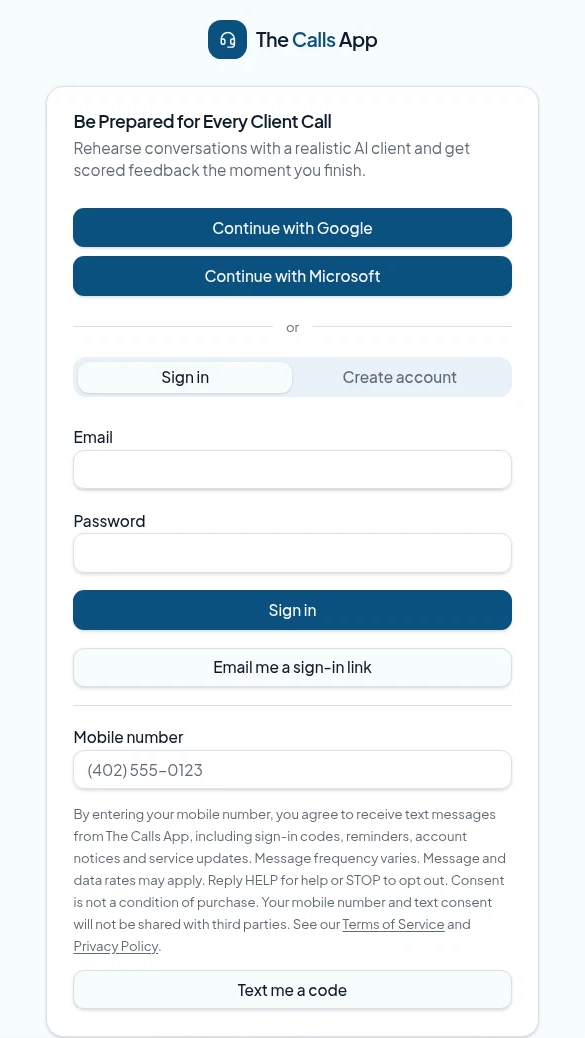
Step 3: Send the code (opt-in)
The user taps to send the code. This is their opt-in. They receive one text message with a one-time code.
Step 4: Sign in
The user enters the code to sign in.
About these messages
- Texts include sign-in codes, reminders, account notices and service updates.
- Message frequency varies.
- Message and data rates may apply.
- Reply HELP for help or STOP to opt out.
- We do not send marketing texts without separate consent.
- SMS opt-in data and consent are not shared with third parties or affiliates for marketing.
See our Terms of Service and Privacy Policy.
Contact us
Denali Training LLC, doing business as The Calls App
2741 Kraft Ln
Missouri Valley, IA 51555
United States
Email: support@denalitraining.com
Phone: (712) 600-4582